The Bar
VenueWiki news — what’s new in the manual and the calendar sync.
Ship notes, new connectors, new venues, and the occasional war story from the crew. Pull up a stool.
Ship notes, new connectors, new venues, and the occasional war story from the crew. Pull up a stool.
Connect Claude, ChatGPT or Grok to VenueWiki. Your AI can onboard whole tech packs, add photos and specs, and answer questions about any venue.
You can now connect Claude, ChatGPT or Grok straight to VenueWiki. Hand your AI a venue's tech pack and it will read it, split it into suggestions and send them in for review, or ask it anything about a venue already on VenueWiki.
Connecteam now syncs both ways with VenueWiki: published shifts land in Google Calendar or Outlook, and your calendar's busy time appears in Connecteam as unavailability — times only, no details. Hourly, or instant on plans with webhooks.
Your company rosters you in Connecteam, but your life's in Google Calendar or Outlook — so the roster manager books you on the day you told everyone you were away, because Connecteam never saw it. VenueWiki now syncs both ways: Connecteam shifts land in your calendar, and anything you're busy with in your calendar shows up in Connecteam as unavailability, without you typing it in twice.
Google lists big rooms like the ivy ballroom as their own place, so venues ended up with two pages. VenueWiki now files those listings as rooms inside the venue, and search takes you straight to the room.
You're rostered to the ivy ballroom. You search it, and you find two pages: one for the ballroom, one for ivy, each holding half of what you need. Google lists the ballroom as its own place, so adding it made a second venue. From today, a listing that's really a room inside a venue we already have gets filed as a room, automatically.
An AV company changed your shift without telling you? VenueWiki's two-way calendar sync now emails you the moment a Rentman, Humanity or Deputy shift changes time, date or gets cancelled — and logs what changed and when.
Occasionally an AV company changes a shift without asking you, or telling you. You said yes to a 10am start — but you can't make an 8 or 9am start, and nobody checked. If a company does the sneaky on you like that, VenueWiki now emails you immediately, and keeps a log of what was changed and when.
Link a rigging plot, patch schematic or spec sheet to a suggestion card and it now appears in the venue's AV manual under the right section, in the Files list and on the card itself — with the same voting as photos, and a way to add links straight from the suggest form.
Link a rigging plot, patch schematic or spec sheet to a suggestion card and it now appears in the venue's AV manual under the right section, in the Files list and on the card itself — with the same voting as photos, and a way to add links straight from the suggest form.
Upload a loading dock policy or technical advance and VenueWiki reads the numbers — dock heights, lift dimensions, door widths, room sizes — and shows the exact line each one came from. Also: AV manuals never silently drop a contribution, and venue-wide cards finally reach their pages.
Upload a loading dock policy or technical advance and VenueWiki reads the numbers — dock heights, lift dimensions, door widths, room sizes — and shows the exact line each one came from. Also: AV manuals never silently drop a contribution, and venue-wide cards finally reach their pages.
Upload a technical advance or dock policy and it is sorted into AV manual cards for review. Rigging gets its own category. Record every lift and loading dock a venue has, with dimensions. Attach PDFs and CAD drawings, or link Dropbox, Google Drive, OneDrive, SharePoint and Sync documents, to any card.
Upload a technical advance or dock policy and it is sorted into AV manual cards for review. Rigging gets its own category. Record every lift and loading dock a venue has, with dimensions. Attach PDFs and CAD drawings, or link Dropbox, Google Drive, OneDrive, SharePoint and Sync documents, to any card.
Turn it on from your profile — your polaroid appears at your venues.
You can now add yourself: flip on self-polaroid from your profile, pass the photo check, and your card shows up at the venues you work — supplier badge and all. First one went live at the MCA the same day it shipped. Faces on walls, the proper way.
Keep personal events from marking you unavailable — by tag or colour.
Not every event in your calendar should tell a roster you're busy. Now you can exclude them — by tag, or by colour — and they won't mark you unavailable. Recolour or retag an event and the sync respects it retroactively. Your calendar, your rules.
Faces on the wall — know who you're working with before you load in.
Venue pages now have a staff wall: polaroid cards of the crew who work there, added by venue managers. Walk into a venue already knowing who's who — names, faces, roles. It's the green-room corkboard, except it's there before you are.
Third roster system connected — your company links once, your shifts flow.
If your company rosters through Humanity, they can now connect it to VenueWiki once and every matched crew member's shifts flow to their own calendar automatically. That's three roster systems live — Rentman, Deputy, Humanity — with Humanforce next on the bench.
One glance at your week tells you who each gig's for.
Working for more than one company? You can now give each connected company its own colour — AV1 in one, Scene Change in another — so a glance at your week tells you who the gig's for. Works on Google Calendar and Outlook. And yes, one of the yellows is called "JJ Yellow" in the picker. The crew know why. Colour per company is part of VenueWiki's Calendar Sync.
Two crew flag the same fix, the page updates — and unverified specs say so.
Every spec on a venue page now carries its provenance. Anything unconfirmed wears an UNVERIFIED badge, and when two crew independently submit the same correction, the page updates to the crew-sourced value — no committee, no gatekeeper. What you read is what the room actually is, because the people in the room said so.
Google Calendar or Outlook — your shifts land in whichever you actually use.
Not everyone lives in Google Calendar. Calendar Sync now writes to Outlook too — same automatic sync, same updates and cancellations, pick whichever calendar you actually look at.
The deal we ran for the crew who built the first pages.
The early pages had to come from somewhere. The deal was simple: invite-only beta, and anyone with 10 approved contributions before July 31 locked in membership free for life. The founding crew who took it built the backbone of the manual — and they never pay. That offer's closed now, but it's why the good venues already have good pages.
Your shifts, on your calendar, without you touching anything.
If your company rosters you through Rentman or Deputy, your shifts now land straight in your Google Calendar — new gigs appear, changed times update, cancelled gigs vanish. Rentman runs two-way: block out a day in your personal calendar and your Rentman availability updates itself. No screenshots, no double-entry, no "hang on, i'll check the app."
What this is, who it's for, and why it exists.
VenueWiki is a shared field manual for event venues — loading docks, patch, power, house rig, room by room — written by the techs who actually work them. It's in closed beta now, with venues across Sydney already documented. If you know a venue like the back of your hand, this is where that knowledge stops walking out the door every time someone changes jobs.
Want the news without checking the bar? It lands in VenueWiki News when you're signed up.
Occasionally an AV company changes a shift without asking you, or telling you. You said yes to a 10am start — but you can't make an 8 or 9am start, and nobody checked. If a company does the sneaky on you like that, VenueWiki now emails you immediately, and keeps a log of what was changed and when.
Swipe, or use ← →, to browse articles.
The problem
Roster software lets a scheduler drag a shift around with no confirmation step and no notification to the crew on it. Your calendar might update, if you notice; your inbox usually gets nothing. If the new time doesn't work for you, you find out on the day, and it becomes your problem instead of theirs.
What we built
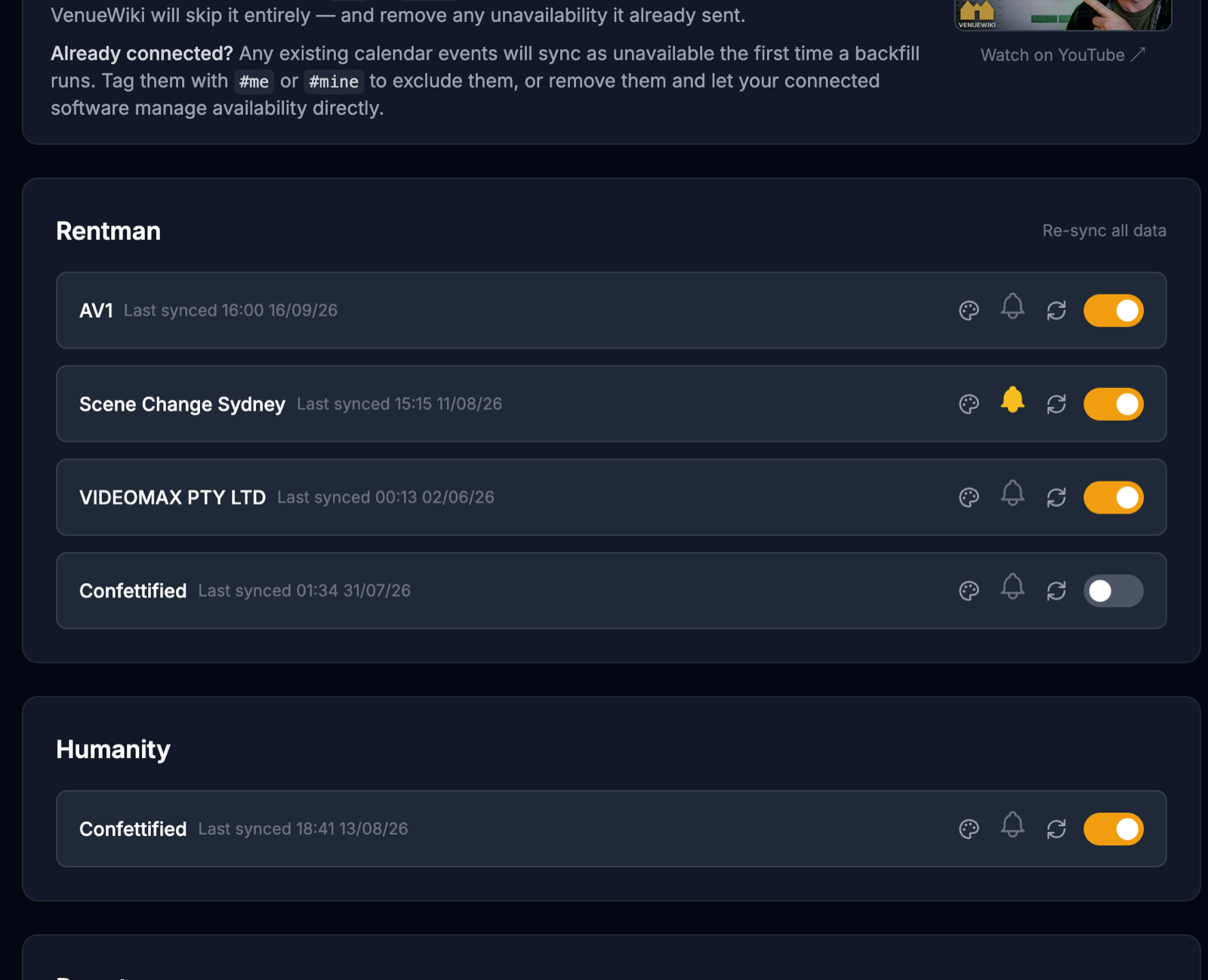
An email, straight away. Turn on the bell next to a company on your calendar-sync page and any change to one of their shifts emails you: the company, the job, what the shift was, what it is now, and the time we caught it. Cancellations too. One email per change, sent the moment we see it — instant for Rentman, within the hour for Humanity and Deputy.
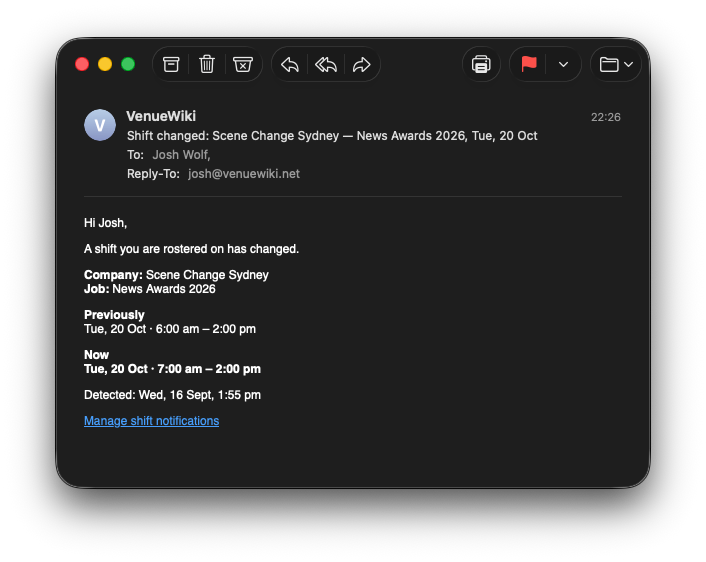
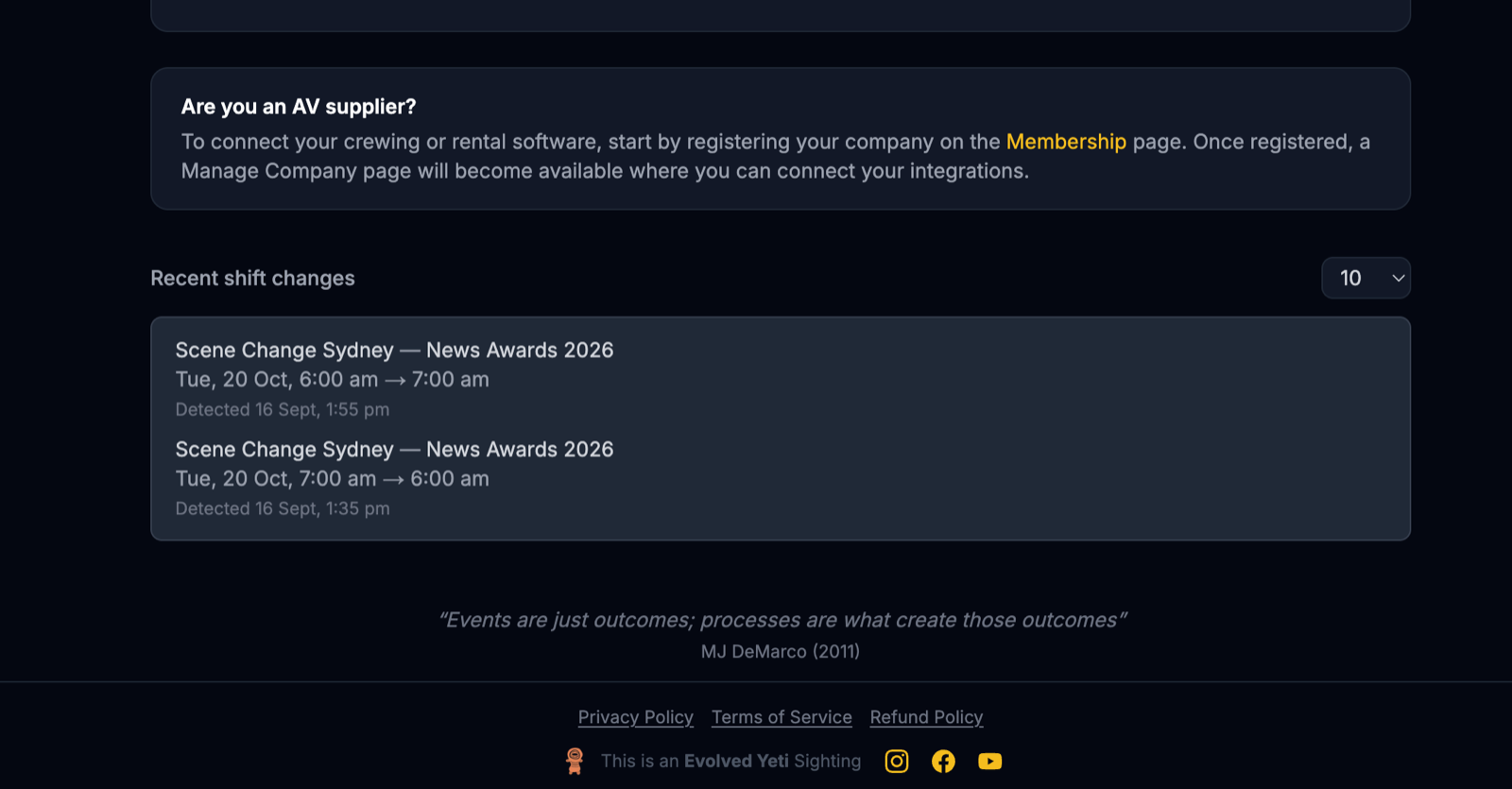
A log on your calendar-sync page. Under your connections there's now a "Recent shift changes" list — every change, newest first, with the old times, the new times and when it was detected. Show 10, 25, 50 or 100. If a company says "it was always an 8am start", you have the receipt.
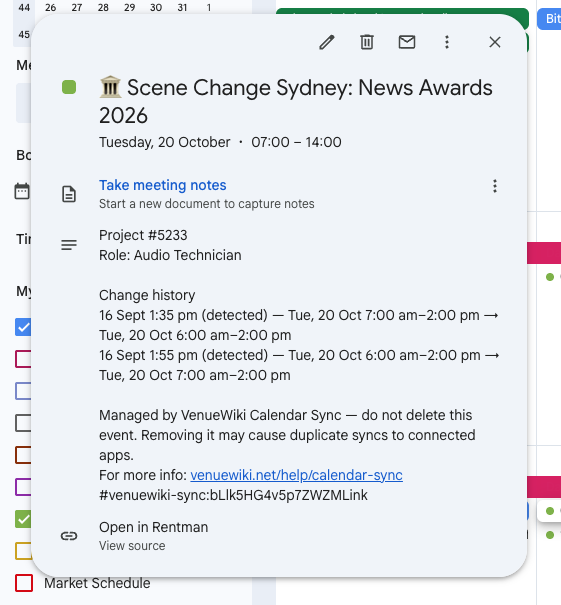
The history inside the event itself. Open a synced shift in Google Calendar and there's a "Change history" section under the job details, listing every move that shift has made. That one's always on — no bell needed — so the record travels with the event, not with an email you have to search for.
The fine print
The bell is per company — watch the ones that do this, ignore the ones that don't. Rentman and Humanity emails say "Detected" rather than "Changed", because those systems don't tell us when the edit was made. Deputy hasn't been run on a live account yet — if something looks off, tell us. Existing events pick up their history the first time they move.
Turn the bell on.
Setup guides: Rentman · Deputy · Humanity · Connecteam · When I Work (coming soon) · all connectors